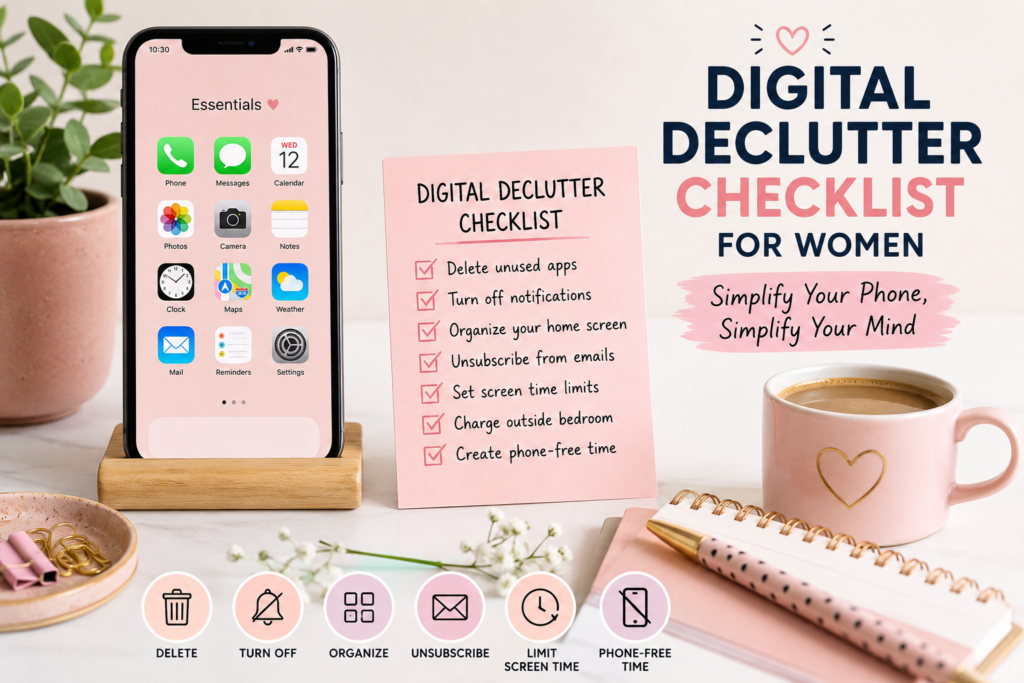
You pick up your phone to check one thing. Forty minutes later, you’re not sure how you got from a text message to a stranger’s kitchen renovation on Instagram. This is not a willpower problem. It’s what a phone loaded with hundreds of apps and constant notifications is designed to do. A proper digital declutter checklist for women juggling work, family, and everything in between isn’t about quitting your phone – it’s about taking back control of it in a single, focused weekend.
Why Your Phone Is the Biggest Source of Mental Clutter
Your brain doesn’t experience a notification as a small thing. Every buzz, badge, and red dot is a tiny interruption that pulls your attention away from whatever you were actually doing – and it takes real mental effort to refocus afterward. Multiply that by the 60-plus times a day most people check their phones, and you get a mind that never fully settles.
This isn’t just anecdotal. A 2025 randomized controlled trial published in BMC Medicine found that cutting daily smartphone screen time to two hours or less for three weeks led to measurable improvements in stress levels, sleep quality, and overall well-being, suggesting the phone itself – not just what’s happening in your life – is contributing to how frazzled you feel. For women specifically, the mental load is often already high: tracking everyone else’s schedules, remembering the things that need remembering, managing the emotional temperature of a household. A phone full of noise adds a second, invisible job on top of the first.
The good news is that this kind of clutter is fixable faster than almost any other kind. You don’t need a new habit tracker or a 30-day plan. You need one weekend and a checklist.

The Full Digital Declutter Checklist (Saturday + Sunday Plan)
This digital declutter checklist for women is built for real schedules no hours-long overhaul, just two focused days. Don’t try to do this in one sitting split it across Saturday and Sunday so it’s manageable and you’re not tempted to quit halfway through.
Saturday: Audit and Delete
- Screen Time review (15 minutes): Open your phone’s screen time report and note your three most-used apps. Most people are surprised by at least one of them.
- Delete without mercy: Remove every app you haven’t opened in the last 30 days. If you hesitate on one, move it to a folder called “Maybe” instead of agonizing over it.
- Turn off non-essential notifications: Go into Settings and disable notifications for every app except calls, texts, and calendar. Shopping apps, games, and social platforms do not need to interrupt you.
- Unsubscribe from noise: Spend 20 minutes unsubscribing from promotional emails and muting group chats that don’t need real-time replies.
- Clean your home screen: Keep only the apps you use daily aim for one screen, not four.
Sunday: Rebuild With Intention
- Set app limits: Use your phone’s built-in Screen Time or Digital Wellbeing tool to cap social media and news apps at a realistic daily limit.
- Create a “landing zone” home screen: Put only functional tools front and center camera, maps, notes, calendar and move everything tempting to a second screen.
- Batch your checking: Decide on two or three set times a day to check email and social media instead of leaving them open all day.
- Charge outside the bedroom: Move your charger to the kitchen or hallway so your phone isn’t the first or last thing you see each day.
- Do a trial evening: Pick one evening this week to go phone-free after 8 p.m. and notice how it feels.
If you’re also trying to figure out where the exhaustion is coming from in the first place, it’s worth pairing this reset with a look at burnout more broadly see our burnout recovery guide for the bigger picture.
Digital Declutter Tips for Women: Apps Worth Keeping or Deleting
Not every app deserves a spot on your phone, but not every app is the enemy either this is the part of the digital declutter checklist for women that people tend to overthink. Use this as a quick gut check during your Saturday audit:
Worth keeping:
- Apps you use for a defined task (banking, navigation, calendar, notes)
- One social app you genuinely enjoy, if you can use it without losing hours
- Tools that save you time elsewhere in your life, like a grocery or meal-planning app
Worth deleting or restricting:
- Anything with infinite scroll that you don’t remember opening on purpose
- Duplicate apps doing the same job (three different shopping apps, two note apps)
- Games or apps you downloaded once and forgot about
- Any app where checking it makes you feel worse, not better, afterward
A simple rule that works for most women: if an app adds something to your life, keep it. If it only takes your time and gives nothing back, it goes. This same instinct asking what’s actually earning its place is the same one behind simplifying your closet or trimming your calendar down to what matters, from our guide on simplifying your life as a woman.

Using AI Screen-Time Tools Without Adding More Notifications
Here’s the honest part: a lot of “AI-powered” screen-time apps solve the wrong problem. They send you a weekly report, a motivational nudge, or a gentle reminder and all of those are just more notifications wearing a wellness costume. If the goal of your digital declutter is fewer interruptions, an app that pings you about your screen time is working against you.
The AI tools actually worth using are the quiet ones built-in features like on-device focus modes that silently block distracting apps during set hours, or smart “downtime” schedules that don’t require you to check in at all. The best version of AI here isn’t a chatbot cheering you on; it’s software that makes a decision once and then leaves you alone. If you’re curious about which tools in this space are genuinely useful rather than gimmicky, our roundup of AI apps that simplify a busy woman’s routine breaks down a few worth trying. The rule of thumb: if an AI feature adds a notification, it doesn’t belong in a digital declutter. If it removes a decision, it does.
FAQs: digital declutter checklist for women
Most of the heavy lifting deleting apps, turning off notifications, cleaning your home screen takes two to three hours total, split across a Saturday and Sunday. Maintenance after that takes just a few minutes a week.
No. Deleting an app from your phone doesn’t delete your account or data stored in the cloud you can always reinstall it later if you change your mind. If you’re worried, check the app’s account settings before deleting.
Keep them, but consider moving them off your home screen or turning off non-urgent notifications so you only see them when you’re actually working, not every time your phone lights up.
It’s not “bad,” but starting your day by reacting to other people’s messages and news before you’ve had a moment for yourself can set a reactive tone for the whole day. Charging your phone outside your bedroom is a small change that helps with this naturally.
No weekends just tend to have fewer interruptions, which makes the audit easier to finish in one go. If a weekday works better for your schedule, the checklist works just as well.
Final Thoughts
A digital declutter checklist for women isn’t a one-time event you check off and forget your phone will slowly fill back up with apps and noise over the next few months, and that’s normal. What matters is that you now have a weekend-sized process you can repeat every few months, instead of a vague sense that you “should probably use your phone less.” Start with Saturday’s audit, protect Sunday’s new habits for at least a week, and notice how much quieter your mind feels once your phone stops competing for your attention every few minutes. If journaling helps you track what shifts for you, our journaling prompts for clarity pair well with this reset.